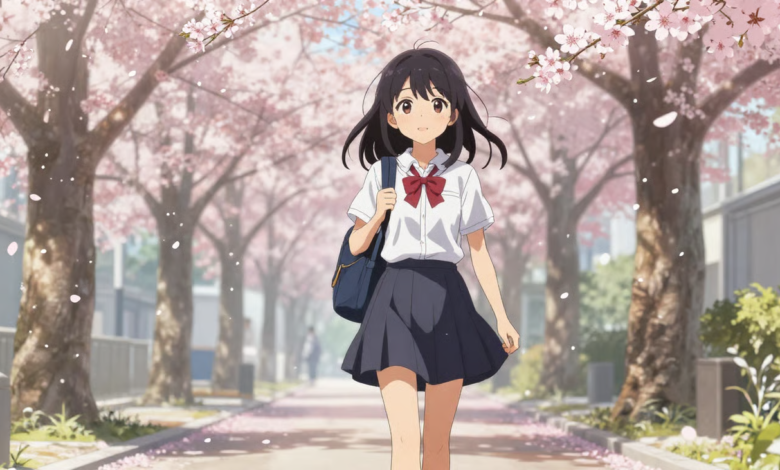
The popularity of photo-to-anime creation has risen as it is a great way to create expressive art illustrations from regular photos. Yet, it is important to maintain facial identity for believable and satisfying outcomes. Framia Pro preserves well-known face features with cutting-edge AI processing and adds appealing anime styling. It is a platform that emphasizes preserving facial expressions, proportions and distinctive features rather than replacing them with generic designs. In this article, you’ll learn why facial preservation is important, how the technology works, and some useful tips for getting anime faces right.
Why Facial Detail Preservation Is Essential in AI Anime Generation
Detail preservation in the face will make the anime look like the original person even after being transformed into anime. A familiar face creates an emotional bond and enhances the overall visual effect. Also, accurate facial expressions that are accurate will convey genuine emotion rather than exaggerated or fake emotions. Proportions of the face are important to avoid over-stylizing and altering the identity. Framia Pro combines anime expression with realistic human features to achieve a natural look. This helps to create memorable character illustrations, social media art, creative storytelling, personal avatars, and digital portfolios. Facial precision also helps creators who are working on a series of scenes with the same character or creating a visual project with multiple faces.
Core AI Technologies That Help Framia Pro Preserve Facial Features
The intelligent facial landmark recognition in Framia Pro detects the key points of the face before transforming the image. Expression-aware processing detects the position of the eyes, the movement of the eyebrows and the smile with amazing accuracy. High Detail Texture Reconstruction preserves nuances in the face and adapts them to create fine anime art. AI feature consistency ensures that the features are consistent across various image generations and editing sessions, keeping them recognizable. Advanced prompt interpretation correlates written instructions with facial details captured for more successful results. Other creative use cases, such as AI picture to video, have similar underpinning technology and the need for visual consistency throughout a series of frames and scenes.
Key Facial Elements That Can Be Preserved During Anime Conversion
There are several facial features that are considered a part of personal identity that are crucial to maintain during the conversion process. Eyes tend to be given special attention as they convey emotion and are always at the center of anime drawings. The expression accuracy and visual recognition are affected by the features of the eyebrows, eyelashes and the iris. Nose shape, facial proportions and lip structure help to preserve real identity without being unrealistic. Hairlines and hairstyles are consistent, ensuring continuity between the original photo and the generated artwork. Skin tones will be naturally converted to anime skin tone, while maintaining overall complexion. Unique accessories, freckles, glasses, scars or marks on the face also help in recognition. The same focus on visual continuity helps creative tools like a lyric video generator, which helps to tell a story with engaging characters using the same face.
Steps to Preserve Facial Details from Photos with AI Anime Generator
Step 1: Choose the right image model for facial accuracy
- First, you need to sign up for Framia Pro. Next, go to the “Home” tab present in the left vertical menu bar.
- Later, click on “Design” from the drop-down menu option present in the bottom-left corner of the dialogue box.
- Next, select the model that best fits your anime portrait creation.
- Under the “Select models” menu, choose the “Image” option.
- You can select from a range of models like “Seedream”, “GPT”, “Nanobanana”, “Flux Max” or “Qwen”.
Step 2: Upload a portrait and describe facial features
- Now click on the “+” tab and choose a photo from your device to provide as a reference.
- Next, in the dialogue box, enter the text prompt and clearly describe the facial details, expressions, and anime appearance you want to preserve.
- Later, select the aspect ratio from the “Settings” tab.
- Finally, click the “Generate” tab to begin photo-to-video creation.
Step 3: Refine facial details and save your anime image
- You can “Preview” your image. If you want to edit your image further, you can do so either in the storyboard or via chat.
- You can “Quick Edit”, “Regenerate image”, or use “AI Erase”, etc.
- Once satisfied, click on the “Download” tab present on the menu below the video to save the file to your local device.
Prompt Writing Strategies for Better Facial Accuracy
The facial accuracy is greatly enhanced by clear prompts, as AI requires detailed instructions along with the uploaded reference image. Use specific terms to describe facial expressions rather than general emotion terms. When relevant, talk about hairstyle, eye color, eyebrow shape, etc. Add lighting preferences since shadows play a role in defining perceived facial structure. Maintain accessories, clothing details, or signature features that help to create a recognizable identity. Describe the anime style without combining conflicting art directions. Don’t make conflicting descriptions that make interpretation difficult or yield different outcomes. A well-crafted prompt will guide the anime generator to produce a well-rounded artistic style, all while preserving distinct facial characteristics and emotional truth.
Best Practices for Uploading High-Quality Reference Photos
Strong reference images provide richer visual information, allowing AI systems to interpret facial characteristics with greater precision and consistency. Consider these practical recommendations before uploading your portrait:
- Display a clear portrait face on and well-focused.
- Don’t use blurry or excessively compressed images.
- Make sure the lighting of the face is balanced.
- Don’t cover eyes, eyebrows, and facial features.
- Remove objects covering important facial areas.
- Where possible, upload high-resolution images.
- Use natural facial expressions rather than poses.
Managing Cross-Format Marketing Content with Framia Pro Canvas
Framia Pro Canvas widens the possibilities of creative production by providing an AI-assisted workspace to link various content tasks within a single workflow. A single, written objective initiates an organized production sequence automatically, without having to switch between separate applications. It produces marketing copy, provides visual assets across various formats and projects and extends projects to full-featured promotional videos with advanced AI models. Voice narration, background music, video creation and editing take place via connected agents, which in turn generate a downloadable result. This workflow streamlines operations and ensures uniformity in creative campaigns in terms of branding and visual quality.
Combining Facial Preservation with Different Anime Styles
This is a useful technique for many anime styles, as identity should remain recognizable despite the variation in art style. Soft anime style for studio, with emphasis on gentle colors, expressive eyes, emotional warmth and familiar proportions. Realistic anime portraits are a mix of cinematic lighting and mature character precision in facial details. Manga-style line art emphasizes the expressive lines, but maintains familiar structures under the simplified drawings. Magical elements are added through the presence of fantasy-inspired characters, but not at the expense of defining facial features. Cyberpunk anime transformations are dramatic lights that add futuristic ambiance without sacrificing identity. Chibi adaptations are thoughtfully proportioned, and recognizable expressions and signature facial detail is still clearly visible, despite the exaggerated artistic styling.
Read also: Dragon Mania Legends Mod Apk
Conclusion
By keeping the face details, anime portraits can still be personal and expressive, and will still be instantly recognizable. Expressions, proportions and details are accurate and result in artwork that is a reflection of the original subject and not a generic character. Framia Pro’s advanced facial analysis, consistent preservation of features, and flexible editing capabilities ensure high-quality anime image creation. The use of careful prompt writing, high-resolution reference pictures and thoughtful style selection can make all the difference to a final product. By considering these practices, one can produce visually engaging anime portraits while preserving authenticity in the artistic transformation.